
Case Study 7
Instructions
- Answer questions A through T of the Morgan Importing Project found on page 417.
- Create and set up the database with the given information.
- Deliver a single sql file, along with a document that contains all the content from the sql file.
- Each query should start with a comment line that looks like:
/* *** CS7-<MI.Q> *** */
Example for Question A:
/* *** CS7-MI.A *** */ - Do not include the result table unless specifically directed to.
- Include at least one line of white space between answers.
Database Information
Tables
EMPLOYEE (EmployeeID, LastName, FirstName, Department, Position, Supervisor, OfficePhone, OfficeFax, EmailAddress)
STORE (StoreName, City, Country, Phone, Fax, EmailAddress, Contact)
PURCHASE_ITEM (PurchaseItemID, StoreName, PurchasingAgentID, PurchaseDate, ItemDescription, Category, PriceUSD)
SHIPPER (ShipperID, ShipperName, Phone, Fax, EmailAddress, Contact)
SHIPMENT (ShipmentID, ShipperID, PurchasingAgentID, ShipperInvoiceNumber, Origin, Destination, ScheduledDepartureDate, ActualDepartureDate, EstimatedArrivalDate)
SHIPMENT_ITEM (ShipmentID, ShipmentItemID, PurchaseItemID, InsuredValue)
SHIPMENT_RECEIPT (ReceiptNumber, ShipmentID, PurchaseItemID, ReceivingAgentID, ReceiptDate, ReceiptTime, ReceiptQuantity, isReceivedUndamaged, DamageNotes)
Referential Integrity Constraints
- Supervisor in EMPLOYEE must exist in EmployeeID in EMPLOYEE
- StoreName in PURCHASE_ITEM must exist in StoreName in STORE
- PurchasingAgentID in PURCHASE_ITEM must exist in EmployeeID in EMPLOYEE
- ShipperID in SHIPMENT must exist in ShipperID in SHIPPER
- PurchasingAgentID in SHIPMENT must exist in EmployeeID in EMPLOYEE
- PurchaseItemID in SHIPMENT_ITEM must exist in PurchaseItemID in PURCHASE_ITEM
- ShipmentID in SHIPMENT_RECEIPT must exist in ShipmentID in SHIPMENT
- PurchaseItemID in SHIPMENT_RECEIPT must exist in PurchaseItemID in PURCHASE_ITEM
- ReceivingAgentID in SHIPMENT_RECEIPT must exist in EmployeeID in EMPLOYEE
Keys and Value Restrictions
EmployeeID of EMPLOYEE, PurchaseItemID of PURCHASE_ITEM, ShipperID of SHIPPER, ShipmentID of SHIPMENT, and ReceiptNumber of SHIPMENT_ RECEIPT are all surrogate keys with values as follows:
| Column | Initial | Increment |
|---|---|---|
| EmployeeID | Start at 101 | Increment by 1 |
| PurchaseItemID | Start at 500 | Increment by 5 |
| ShipperID | Start at 1 | Increment by 1 |
| ShipmentID | Start at 100 | Increment by 1 |
| ReceiptNumber | Start at 200001 | Increment by 1 |
Values of the Country column in the STORE table are restricted to:
- Hong Kong
- India
- Japan
- Peru
- Philippines
- Singapore
- United States
Questions MI.A - MI.T
A.) Do you think STORE should have a surrogate key? If so, create it and make any required adjustments in the database design. If not, explain why not. Are there any other adjustments to STORE and the other tables that you think are appropriate? If so, explain what should be changed, and make any required adjustments in the database design. If you decide to use a surrogate key for STORE, start the surrogate values at 1000 and increase by 50.
B.) Specify NULL/NOT NULL constraints for each table column.
C.) Specify alternate keys, if any.
D.) State relationships as implied by foreign keys, and specify the maximum and minimum cardinality of each relationship. Justify your choices.
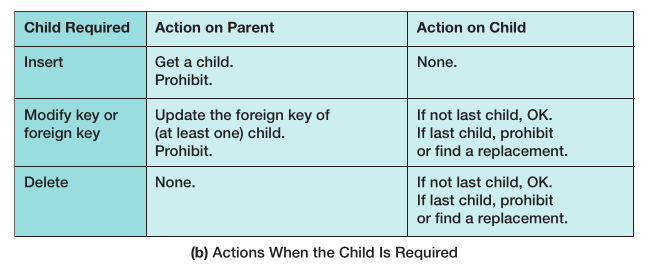
E.) Explain how you will enforce the minimum cardinalities in your answer to part D. Use referential integrity actions for required parents, if any. Use the Figure below as a boiler-plate for required children, if any.
Figure 6.29: Actions When the Child is Required
F.) Create a database named MI in your DBMS.
G.) Create a folder in your Documents folder to save and store *.sql scripts containing the SQL statements that you are asked to create in the remaining questions in this section.
- For the SQL Server Management Studio, create a folder named MI-Database in the Projects folder structure in your SQL Server Management Studio folder.
- In the Oracle SQL Developer folder structure in your SQL Developer folder, create a folder named MI-Database.
- For the MySQL Workbench, create a folder named MI-Database in the Schemas folder in your MySQL Workbench folder.
Using the MI database, create a SQL script named MI-Create-Tables.sql to answer parts H and I. Your answer to part I should be in the form of a SQL comment in the script.
H.) Write CREATE TABLE statements for each of the tables using your answers to parts A through E, as necessary. If you decided to use a StoreID surrogate key, set the first value to 1000 and increment by 50. Set the first value of EmployeeID to 101 and increment by 1. Set the first value of ShipperID to 1 and increment it by 1. Set the first value of PurchaseItemID to 500 and increment it by 5. Set the first value of ShipmentID to 100 and increment it by 1. ReceiptNumber should start at 200001 and increment by 1. Use FOREIGN KEY constraints to create appropriate referential integrity constraints. Set UPDATE and DELETE behavior in accordance with your referential integrity action design. Set the default value of InsuredValue to 100. Write a constraint that STORE.Country be limited to seven countries (Hong Kong, India, Japan, Peru, Philippines, Singapore, United States).
I.) Explain how you would enforce the rule that SHIPMENT_ITEM.InsuredValue be at least as great as PURCHASE_ITEM.PriceUSD.
Using the MI database, create a SQL script named MI-Insert-Data.sql to answer part J.
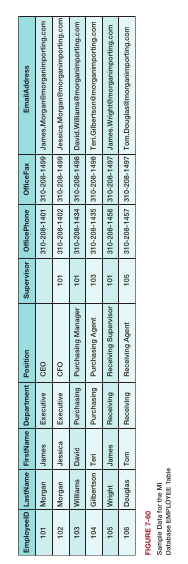
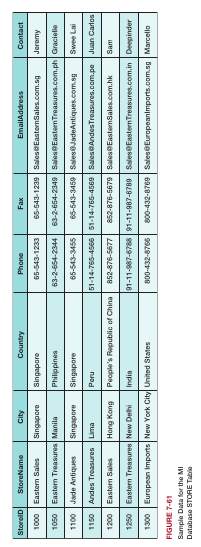
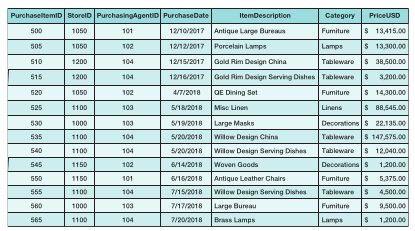
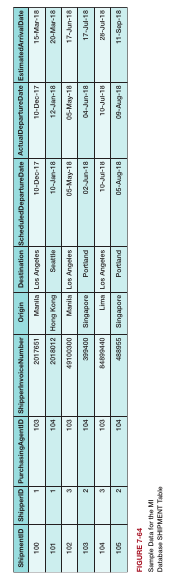
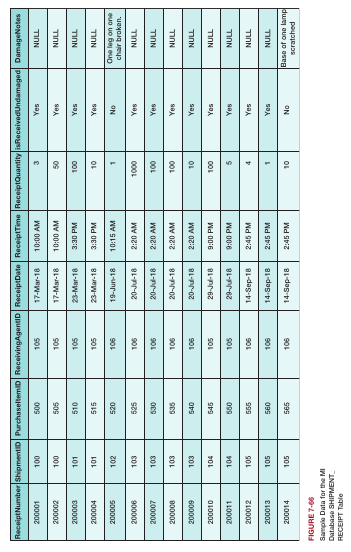
J.) Write INSERT statements to insert the data shown in the Figures below.
Figure 7.60: Sample Data for the EMPLOYEE Table
__
Figure 7.61: Sample Data for the STORE Table
__
Figure 7.62: Sample Data for the PURHCASE_ITEM Table
__
Figure 7.63: Sample Data for the SHIPPER Table

__
Figure 7.64: Sample Data for the SHIPMENT Table
__
Figure 7.65: Sample Data for the SHIPMENT_ITEM Table

__
Figure 7.66: Sample Data for the SHIPMENT_RECEIPT Table
Using the MI database, create a SQL script named MI-DML-CH07.sql to answer parts K and L.
K.) Write an UPDATE statement to change values of STORE.City from New York City to NYC.
L.) Create new data records to record a SHIPMENT and the SHIPMENT_ITEMs for that SHIPMENT. Write the INSERT statements necessary to add these records to the MI database, and then write a DELETE statement(s) to delete that SHIPMENT and all of the items on that SHIPMENT. How many DELETE statements did you have to use? Why?
Using the MI database, create a SQL script named MI-Create-Views-and-Functions.sql to answer parts M through S.
M.) Write a SQL statement to create a view called EmployeeSupervisorView that shows who, if anyone, supervises each employee at The Queen Anne Curiosity Shop, and which contains E1.LastName as EmployeeLastName, E1.FirstName as EmplyeeFirstName, E1.Position, E2.Lastname as SupervisorLastName, and E2.FirstName as SupervisorFirstName. E1 and E2 are two aliases for the EMPLOYEE table, and are required to run a query on a recursive relationship. Include employees who do not have a supervisor. Run the statement to create the view, and then test the view with an appropriate SQL SELECT statement.
N.) Write a SQL statement to create a view called PurchaseSummaryView that shows only PUCHASE_ITEM.PurchaseItemID, PURCHASE_ITEM.PurchaseDate, PURCHASE_ITEM.ItemDescription, and PURCHASE_ITEM.PriceUSD. Run the statement to create the view, and then test the view with an appropriate SQL SELECT statement.
O.) Create and test a user-defined function named StoreContactAndPhone that combines two parameters named StoreContact and ContactPhone into a concatenated data field formatted StoreContact: ContactPhone (including the colon and space).
P.) Write a SQL statement to create a view called StorePurchaseHistoryView that shows STORE.StoreName, STORE.Phone, STORE.Contact, PURCHASE_ITEM.PurchaseItemID, PURCHASE_ITEM.PurchaseDate, PURCHASE_ITEM.ItemDescription, and PURCHASE_ITEM.PriceUSD. Run the statement to create the view, and then test the view with an appropriate SQL SELECT statement.
Q.) Write a SQL statement to create a view called StoreContactPurchaseHistoryView that shows STORE.StoreName, the concatenated result of STORE.Phone and STORE.Contact from the StoreContactAndPhone function, PURCHASE_ITEM.PurchaseItemID, PURCHASE_ITEM.PurchaseDate, PURCHASE_ITEM.ItemDescription, and PURCHASE_ITEM.PriceUSD. Run the statement to create the view, and then test the view with an appropriate SQL SELECT statement.
R.) Write a SQL statement to create a view called StoreHistoryView that sums the PriceUSD column of StorePurchaseHistoryView for each store into a column named TotalPurchases. Run the statement to create the view, and then test the view with an appropriate SQL SELECT statement. (Hint: Assume unique store names.)
S.) Write a SQL statement to create a view called MajorSources that uses StoreHistoryView and selects only those stores that have TotalPurchases greater than 100000. Run the statement to create the view, and then test the view with an appropriate SQL SELECT statement.
T.) Explain in general terms how you would use triggers to enforce minimum cardinality actions as required by your design. You need not write the triggers; just specify which triggers you need and describe their logic in general terms.